Overview
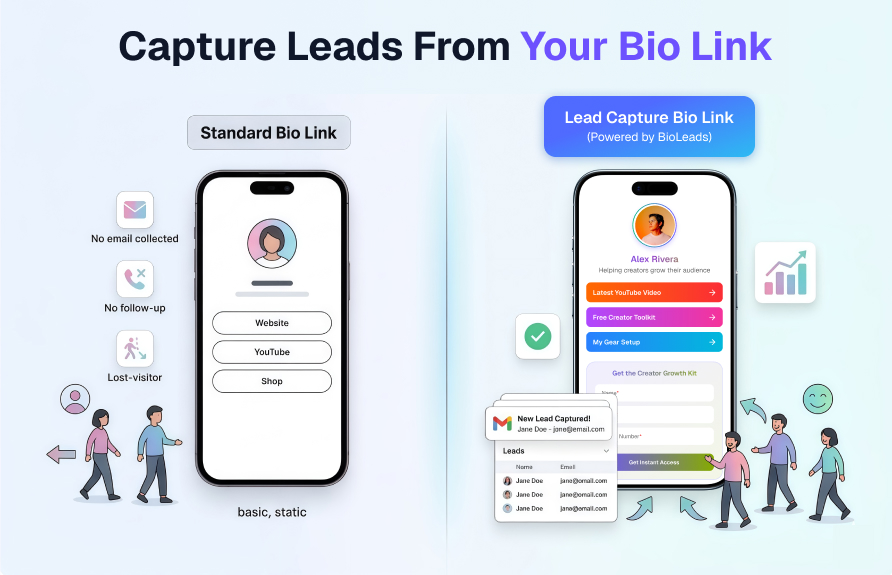
Every day, thousands of people click your bio link and leave without giving you a way to reach them again. A standard bio link — Linktree, a plain website URL, or any basic list of links — does one thing: it sends visitors away. Once they are gone, they are gone. You have no name, no email, no phone number, and no way to follow up.
A lead-capture bio page works differently. Instead of immediately redirecting visitors, it gives them a reason to share their contact details first — then sends them wherever they want to go. The result is a list of warm, interested contacts who already know who you are and what you offer.
BioLeads is built specifically for this workflow. You publish one page, add your links, attach a lead form, and start collecting names and emails from the same traffic you were already generating.
Why standard bio links lose leads
A basic bio link page is designed to be a signpost. It says “go here” or “go there” and then the visitor disappears into whatever destination you pointed them to.
The problem is that most visitors do not convert on the first visit to an external page. Research consistently shows that between 70 and 96 percent of website visitors never return after leaving a page for the first time.
When that happens through a bio link, you have lost that visitor permanently. You cannot retarget them through email. You cannot send them a follow-up. You cannot nurture them toward a purchase or a booking.
The fundamental issue is that the standard bio link creates a one-way door. A lead-capture page creates a conversation.
What a lead capture bio page actually does
A lead capture bio page combines two things that normally live in separate tools: a link directory and a contact form.
Visitors land on your page, see your links, and are invited to share their name and email before they click through to any destination.
This is not a barrier or a gate that blocks access. It is an offer. You give the visitor something valuable in exchange for their contact details — a free guide, early access to content, a discount code, or simply the promise that you will stay in touch.
They opt in because they want to, and you gain a contact you can reach again and again.
Step-by-step: setting up lead capture on your bio page
Step 1 — Create your BioLeads page
Sign up for a free BioLeads account at bioleads.link. Choose a custom URL that matches your brand or your name.
Add your profile image, a short bio, and your primary links. This takes under ten minutes and no technical skills are required.
Step 2 — Add your lead capture form
Inside your BioLeads dashboard, enable the lead form for your page. Choose which fields to include.
For most creators and consultants, name and email are sufficient for a first touch. If you are collecting leads for a service that requires phone follow-up, add a phone field.
Keep the form short — every additional field reduces the completion rate.
Step 3 — Write a clear offer
Tell visitors exactly what they get when they submit the form.
“Get my free content calendar” works better than “Join my newsletter.” Be specific. The offer headline sits above the form and it is the single biggest factor in whether someone fills it in.
Step 4 — Set up your auto-responder
BioLeads sends an automatic email to each new lead the moment they submit the form.
Write a short, direct message that delivers on your offer and sets expectations for what they will hear from you next.
This first email has the highest open rate of any message you will ever send — treat it carefully.
Step 5 — Put your BioLeads URL in your profile
Replace your current bio link with your BioLeads URL. Post your normal content. The lead capture starts working the moment your audience visits the page.
What to offer in exchange for contact details
The offer you attach to your lead form determines how many people fill it in. A weak or vague offer produces a low opt-in rate. A specific, high-value offer produces a high one.
-
A free downloadable resource
A PDF guide, checklist, template, or mini-course that your audience would genuinely find useful. -
Early or exclusive access
Offer early access to a product launch, course, or community. -
A free consultation or audit
Works well for consultants, coaches, and service providers. -
A discount or special pricing
Great for e-commerce or digital product sellers. -
A valuable newsletter
“Weekly tips on growing your freelance business” is stronger than “sign up for updates.”
How to track which sources produce the most leads
BioLeads tracks where each visitor came from before they arrived on your page.
This means you can see whether your Instagram posts, TikTok videos, Twitter threads, or YouTube descriptions are driving the most lead activity — not just the most clicks.
A source that sends 500 clicks but zero leads is less valuable than a source that sends 50 clicks and 20 leads.
Check your source data weekly. Double down on the channels producing leads and improve or reduce the ones producing only clicks.
Common mistakes to avoid
-
Asking for too much information upfront
A form with many fields drastically reduces completion rate. -
Using a vague offer
Name a clear benefit for signing up. -
Burying the form
The lead form should appear without scrolling on mobile. -
Not following up
Set up at least a three-email welcome sequence. -
Not testing the form
Submit the form yourself to confirm the autoresponder works correctly.
Start capturing leads from traffic you already have
The traffic hitting your bio link right now is warm. These are people who found your profile, read your bio, and clicked your link.
The only question is whether your bio page is built to capture that intent or let it disappear.
BioLeads is free to start, takes under ten minutes to set up, and begins working the moment you update your profile link.
Start your free BioLeads page and capture your first lead today